Verdict
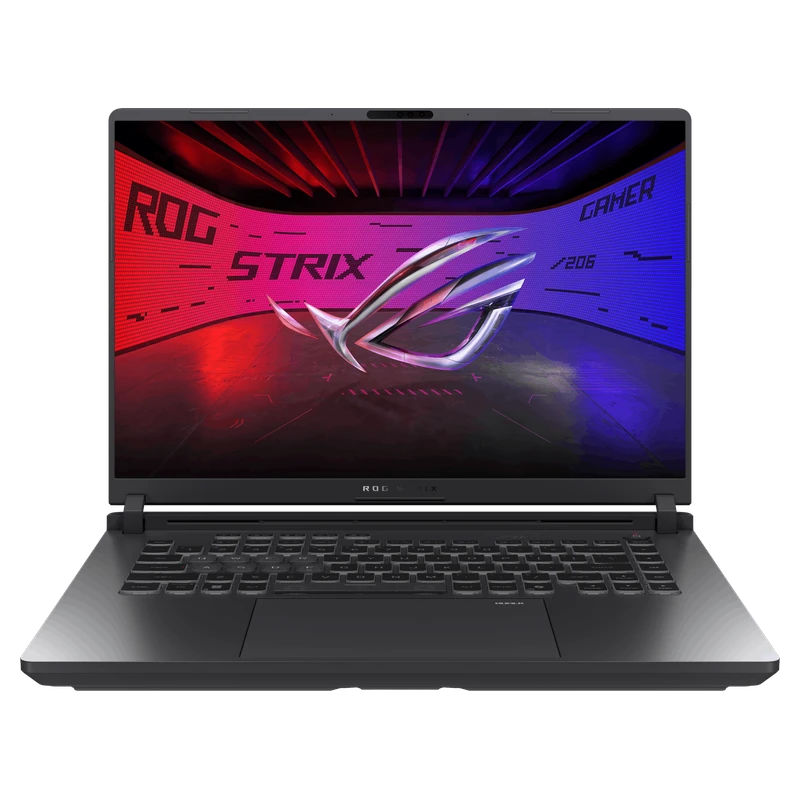
The ROG Strix G16 is ASUS's performance-first 16-inch alternative to the thinner Zephyrus G16. The official ASUS ROG Strix G16 platform combines a Core Ultra 9 275HX with an RTX 5080 Laptop GPU rated up to 175W, a fast 2560×1600 display and serviceable memory and storage. That makes the chassis credible for demanding gaming and creation workloads where portability is secondary.
This is an evidence review rather than a hands-on test. FRAMELIMIT has not measured its frame rates, temperatures, fan noise, battery life or display response. The linked Amazon page matches the advertised CPU, GPU, 64GB memory, 1TB storage and display class, but the incomplete retailer identification means those bundle details should not be treated as an ASUS factory configuration.
- RTX 5080 platform rated up to 175W
- 240Hz 2560×1600 Nebula display specification
- Two SO-DIMM and two M.2 slots
- Thunderbolt 5 and 2.5Gb Ethernet
- Approximately 2.65kg before the 380W adapter
- IPS-level panel lacks OLED contrast and Mini LED local dimming
- Amazon bundle omits the full factory suffix
- Linked offer was unavailable when checked
Platform and Linked-Bundle Specifications
| Model family | ASUS ROG Strix G16 |
| GPU | NVIDIA GeForce RTX 5080 Laptop GPU, 16GB GDDR7, up to 175W including Dynamic Boost |
| CPU | Intel Core Ultra 9 275HX |
| Memory | 64GB DDR5 claimed by the linked bundle; two DDR5-5600 SO-DIMM slots, 64GB platform maximum |
| Storage | 1TB PCIe 4.0 NVMe claimed by the linked bundle; two M.2 PCIe slots |
| Display | 16-inch 2560×1600 IPS-level ROG Nebula, 240Hz, 3ms manufacturer rating, 500 nits, 100% DCI-P3 |
| Battery / weight | 90Wh / approximately 2.65kg |
| Power adapter | 380W for the linked configuration |
Performance: What 175W Does and Does Not Prove
ASUS specifies up to 150W GPU power plus 25W Dynamic Boost for the RTX 5080 configuration. This places the ASUS ROG Strix G16 in the highest advertised RTX 5080 laptop power class, but 175W is a ceiling rather than a guaranteed continuous draw. CPU load, firmware, thermal headroom, the selected performance mode and the workload all influence actual behavior.
The linked 64GB bundle remains unranked because there is no complete controlled benchmark set tied to its identifiable factory suffix. Results from another ASUS ROG Strix G16 can describe the platform, but they cannot prove the performance of this retailer-upgraded offer. FRAMELIMIT therefore does not invent an FPS lead or reuse measurements from a neighboring configuration.
Display
The official 16-inch Nebula panel specification is 2560×1600 at 240Hz, with a 16:10 aspect ratio, 500-nit rating, 100% DCI-P3 coverage and a 3ms manufacturer response claim. Those figures suit high-refresh gaming and color-aware work on paper. They are specification targets, not measurements of the reviewed unit. The IPS-level panel avoids OLED-specific burn-in concerns, while OLED competitors still offer materially deeper blacks.
Cooling and Sustained Use
ASUS describes a vapor chamber, Tri-Fan layout and Conductonaut Extreme liquid metal in this generation. Those design choices aim to manage the combined CPU and GPU load of a thick performance laptop. They do not establish real noise or temperature results on their own, so this review does not publish unsupported decibel or thermal numbers. Buyers sensitive to fan noise should consult a test of the same factory configuration and performance mode.
Memory, Storage and Ports
Two SO-DIMM slots and two M.2 slots are a strong serviceability advantage over laptops with soldered memory. ASUS lists a 64GB memory ceiling. The linked offer claims 64GB, but buyers should verify the memory brand, module layout and warranty responsibility with the seller because the listing does not expose a complete factory configuration. ASUS also warns that only single-sided SSDs are supported because components sit near the M.2 area.
The official configuration matrix includes three USB-A 10Gbps ports and two Thunderbolt 5 ports with DisplayPort and Power Delivery, plus 2.5Gb Ethernet and a 3.5mm combo jack. That is a practical desktop setup for fast storage, wired networking and external displays. Charging behavior and display routing can still vary by port and operating mode.
Battery and Portability
A 90Wh battery is substantial, but the Core Ultra HX processor, 240Hz panel and high-power GPU make unplugged runtime workload-dependent. The approximately 2.65kg laptop and 380W adapter are better suited to room-to-room movement than daily lightweight travel. Users who value a smaller charger and a lighter bag should compare the Zephyrus G16, accepting its lower GPU power ceiling.
Buying Advice
Choose this platform when maximum RTX 5080 power, replaceable memory and storage, wired networking and a fast IPS display matter more than weight. Compare the final seller, warranty terms and configuration at checkout. As of September 10, Amazon product page was unavailable and did not expose a current price, so it cannot support a present-day value ranking. The buyer-facing site intentionally avoids publishing a stale individual price.
See the Legion Pro 7i vs ROG Strix G16 RTX 5080 comparison and the Lenovo Legion Pro 7i Gen 10 review for another 175W option. Use the Best Flagship Gaming Laptops guide and the RTX 5080 laptop guide for broader context, and verify power classes in the RTX 50 Laptop TGP Database. The DLSS and Frame Generation evidence database explains why generated output is not directly interchangeable with rendered FPS. Then compare the lighter ASUS ROG Zephyrus G16 review.
Sources
Platform specifications and Amazon retail mapping were checked September 10, 2026. Amazon US was viewed with delivery set to ZIP 10001. Stock and seller details can change after publication.
Benchmark context
No additional synthetic score is assigned to this configuration. A matching GPU name alone cannot establish matching performance: CPU, graphics power, memory and cooling can change the result.
For game-specific comparisons, use Notebookcheck’s game database and inspect the contributing laptop, resolution and preset. Separate native rendering, upscaling and frame generation. In 3DMark result search, inspect the individual run and configuration before comparing; a leaderboard entry is not a typical retail result.
The buying verdict
Is ASUS ROG Strix G16 right for you?
Choose it for
RTX 5080 graphics and upgradeable memory.
Consider another option if
OLED or a lighter chassis matters more to your daily use.
FRAMELIMIT may earn a commission from qualifying purchases at no extra cost to you.