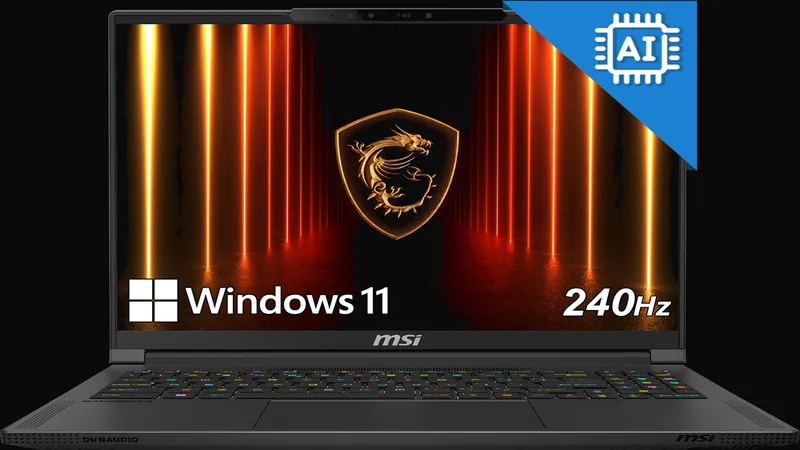
Full Specifications
| GPU | RTX 5070 Ti 12GB GDDR7 · exact US-SKU power limit not confirmed here |
| CPU | AMD Ryzen AI 9 HX 370 · 12 cores |
| RAM | 32GB LPDDR5X · soldered |
| Storage | 2TB PCIe Gen4 NVMe |
| Display | 16" 2560×1600 OLED 240Hz · manufacturer-listed 100% DCI-P3 |
| Weight | Approximately 2.0–2.1kg; see listing discrepancy below |
| Battery | 99.9Wh |
| Price | Check current price |
Gaming Performance and 3DMark
These related-configuration results use a Ryzen AI 9 HX 370 / RTX 5070 Ti model with 64GB LPDDR5X, rather than the linked 32GB A3XWHG-079US. They retain the publisher's 1080p settings and are context, not exact-SKU measurements. Upscaling, Frame Generation, and GPU power remain explicitly marked as not stated where the source does not identify them.
Thermals, Battery and Travel
The official US listing specifies a 99.9Wh battery and a 240W adapter. Neither capacity nor adapter rating establishes measured runtime. Compare unplugged use with the same screen brightness, graphics mode and workload; do not expect plugged-in gaming performance to carry over to battery power.
MSI's listing gives approximately 4.39lb in one section and 4.63lb in its detailed table. Budget around 2.0–2.1kg for the laptop, plus its charger, and confirm the shipping configuration if travel weight is decisive. We have not measured this exact unit's fan noise or sustained temperatures; look for sustained-load and battery tests of the matching configuration before relying on either for a purchase.
OLED Display and Desk Setup
The manufacturer lists a 2560×1600 OLED panel at 240Hz with 100% DCI-P3 coverage. Those specifications describe resolution, refresh rate and intended gamut; they do not prove calibration accuracy or measured brightness. For editing, verify a suitable profile and your color-managed workflow. For games, compare actual frame rates at 1600p rather than assuming that every title will reach 240fps.
The official configuration has HDMI 2.1, USB4 with DisplayPort and power delivery, two USB-A ports and 2.5Gb Ethernet, but no card reader. A photographer should allow for a USB reader; a dock user should check display support and charging limits. Use the included adapter for performance comparisons instead of assuming a USB-C dock supplies equivalent power.
Memory, Storage and Configuration Traps
MSI explicitly lists 32GB LPDDR5X and a 2TB Gen4 SSD for A3XWHG-079US. Amazon's generic DDR5 wording should not override the OEM memory specification. The benchmark unit's 64GB capacity is a different configuration, not evidence that this retail machine can be upgraded to match it.
Before ordering, match the full A3XWHG-079US code, 32GB memory and 2TB drive. For future SSD work, consult the exact service documentation for access, slot occupancy and clearance. Keeping the factory 2TB drive may be more practical than buying an upgrade immediately; large recording libraries can also use external storage, subject to the enclosure and port speed.
Pros & Cons
- RTX 5070 Ti with 12GB graphics memory
- OLED 240Hz display
- 2TB factory SSD in A3XWHG-079US
- USB4, HDMI and wired Ethernet
- Portable 16-inch configuration
- Soldered RAM — buy 32GB or 64GB upfront
- No SD card reader
- Published benchmarks use a different memory configuration
Who Should Buy This?
You want RTX 5070 Ti performance with genuine portability. Perfect for mixed work+gaming use with regular travel.
You need upgradeable RAM. The soldered memory means you're locked at purchase config forever.
Sources
MSI official A3XWHG-079US listing supplies the retail specifications. The benchmark table links to its independent publisher and identifies the different test configuration. Editorial and specification review: September 8, 2026; current checkout price is not verified.
Related Reviews and Alternatives
Compare this thin 16-inch model with the ROG Zephyrus G16 review, the AMD-based Lenovo Legion 5 Gen 10 review, and the full-power Lenovo Legion Pro 7i Gen 10 review.
Benchmark context
No additional synthetic score is assigned to this configuration. A matching GPU name alone cannot establish matching performance: CPU, graphics power, memory and cooling can change the result.
For game-specific comparisons, use Notebookcheck’s game database and inspect the contributing laptop, resolution and preset. Separate native rendering, upscaling and frame generation. In 3DMark result search, inspect the individual run and configuration before comparing; a leaderboard entry is not a typical retail result.
The buying verdict
Is MSI Stealth A16 AI+ right for you?
Choose it for
OLED and 12GB VRAM in a more portable chassis.
Consider another option if
You need upgradeable memory or exact-configuration measurements.
FRAMELIMIT may earn a commission from qualifying purchases at no extra cost to you.